Agentic AI Image Workflows with APIs and n8n: A Guide
An image workflow becomes agentic when software can inspect the current job, choose from a limited set of tools, evaluate the result, and decide what should happen next. That is different from a fixed automation that runs the same nodes in the same order for every file.
The distinction matters in production. An agent may decide that a product photo needs background removal before upscaling, route an uncertain result to review, or retry a temporary API failure. It should not receive unlimited freedom to generate, modify, and publish assets without boundaries. A useful agentic workflow combines flexible decisions with deterministic validation, clear stop conditions, and human approval where mistakes carry real cost.
What makes an image workflow agentic?
A conventional workflow is best when the decision tree is already known. For example, every uploaded product image may need the same resize operation and file-name convention. An agent adds value when the correct action depends on the image, metadata, previous tool output, or business rules.
A bounded image agent normally performs three kinds of work:
- Observe: read the request, asset metadata, processing history, and allowed destination.
- Decide: select an approved tool and parameters from a small action set.
- Evaluate: check the returned file against explicit acceptance criteria before continuing.
The agent does not need to control every step. File validation, authentication, rate limiting, storage, and publication rules are safer as regular workflow logic. The model can handle ambiguous routing while deterministic nodes enforce the contract.
A reference architecture for agentic image processing
A production workflow is easier to reason about when each responsibility has a visible boundary. The following sequence works for catalog images, campaign assets, social media variants, and other repeatable visual jobs:
- Intake and validation. A webhook, schedule, queue, or application event creates a job. The workflow checks the file type, source, required metadata, and intended output before an AI component sees the request.
- Policy and planning. The agent receives a compact description of the job, a list of permitted actions, and stop conditions. It chooses the next tool rather than inventing an unrestricted plan.
- Image processing tools. API calls perform defined operations such as generation, enhancement, upscaling, background removal, or format conversion.
- Quality gate. Deterministic checks verify dimensions, format, file size, transparency, and other measurable requirements. A vision model can provide an additional semantic assessment, but it should return structured output that the workflow can validate.
- Approval or retry. Accepted results move forward. Uncertain results go to a person or a limited retry branch. The workflow stops when it reaches its attempt, time, or cost limit.
- Delivery and audit. The accepted asset is stored or sent to its destination with the job ID, processing history, and final decision recorded.
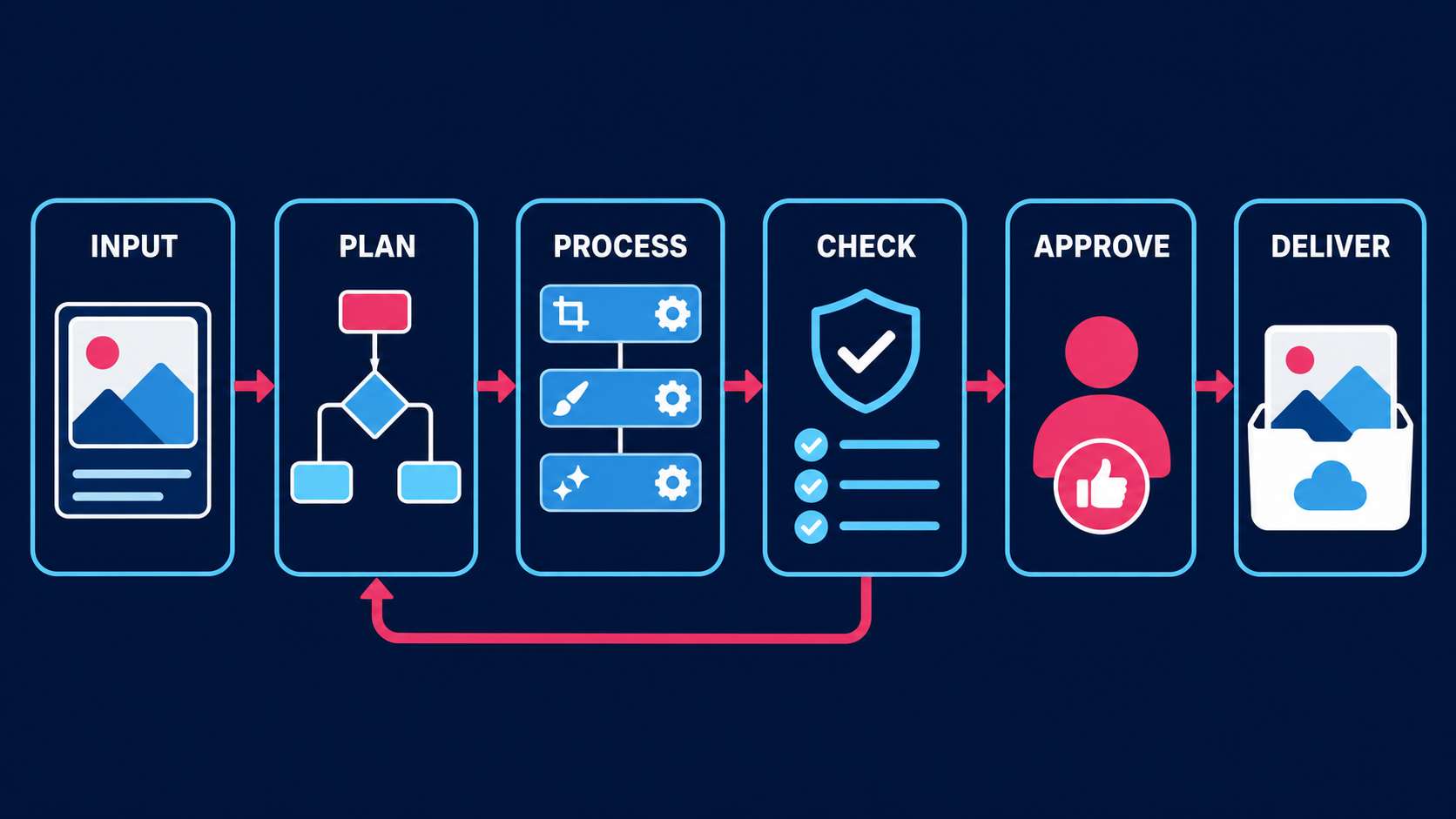
This design keeps the agent inside a controlled loop. It can select an action and interpret a result, but the surrounding workflow decides which tools exist, how many attempts are allowed, and when publication is permitted.
How to build the workflow in n8n
n8n is useful here because one workflow can combine triggers, API requests, branching, waiting, error handling, and AI nodes. The goal is not to place an AI Agent node in front of every operation. It is to use agent behavior only at points where a fixed rule cannot make the decision reliably.
Start with a clear trigger and job contract
A Webhook or Schedule Trigger can start the workflow. Normalize every event into one internal job shape containing an ID, the source image location, the requested output, the allowed destination, and any policy flags. Reject missing or unsupported input early. This prevents later nodes from guessing what the job means.
For high-volume systems, keep the initial webhook response separate from the long-running image work. The article on webhooks and asynchronous image APIs explains why accepting a job and finishing it are often two different events.
Give the agent a small toolbox
An n8n AI Agent can work with connected tools, but each tool should represent a narrow action. Useful examples include selecting an approved processing preset, requesting a semantic image check, or routing an asset to a review queue. Tool descriptions should state required inputs, valid outputs, and situations in which the tool must not be used.
Do not place credentials, raw authorization headers, or arbitrary URLs in the agent prompt. Store credentials in n8n and pass only the data required by the selected node. Treat product descriptions, file metadata, external webpages, and model output as untrusted input.
Call image services through defined API nodes
The HTTP Request node can connect the workflow to an image API when a dedicated node is not available. Build the request from validated fields rather than letting the agent produce a complete URL or free-form JSON body. Preserve the job ID across calls so retries and callbacks can be matched to the correct asset.
Image processing may complete asynchronously. When an API returns a job identifier, store it and use the provider's documented callback or status mechanism. Avoid aggressive polling. The workflow should also recognize rate-limit and temporary server responses, wait according to policy, and stop after a defined number of attempts. The guide to rate limits and image API payloads covers these operational controls in more detail.
Separate quality checks from agent opinion
Start with checks that have objective answers. Confirm that the file exists, opens correctly, uses an accepted format, and matches required dimensions. For a transparent-background task, inspect the alpha channel. For a marketplace asset, verify the expected aspect ratio and file-size range.
A model-based evaluator can then answer narrower semantic questions, such as whether the main product remains visible or whether the generated scene matches the requested category. Require a structured result with a decision, reason, and confidence band. Route uncertain cases to review instead of turning a low-confidence assessment into an automatic publication.
Add a human fallback before costly actions
Human approval is useful before publishing, overwriting a source asset, sending content to a paid campaign, or accepting an output that failed one quality check. The reviewer should see the input, proposed output, requested operation, and reason for escalation. Approval should resume the existing job rather than create a second unrelated execution.
A review step is not evidence that the agent failed. It is part of the control design. Over time, review decisions can show which rules are stable enough to automate and which cases still need judgment.
Design retries and errors before activation
Define the failure path before activating the workflow. Distinguish temporary network failures from invalid input, rejected content, exhausted credit, and provider errors. A retry may help with a timeout but will not fix a malformed request.
Use an error workflow or dedicated error branch to capture the job ID, failed node, response class, and next action. Make delivery idempotent so retrying an execution does not publish the same asset twice. For larger pipelines, the guide to scaling image processing workflows describes queueing, concurrency, and observability concerns around the model calls.
Example: an agentic product image workflow
Consider a catalog team receiving product photos from several suppliers. The files vary in size, background, crop, and quality. A practical n8n workflow could run as follows:
- A webhook creates a job and validates the supplier ID, product ID, source file, and target marketplace.
- Deterministic checks record the current dimensions, format, aspect ratio, and transparency.
- The agent selects from approved actions based on the requested listing format and the observed file state.
- The workflow calls the required image API operations and stores every returned asset as a new version.
- A quality gate compares the result with the marketplace specification and checks that the product remains intact.
- Low-confidence or rejected results go to a reviewer. Accepted assets move to storage and the catalog receives the final URL.
The workflow can make conditional decisions without giving the model permission to modify the catalog directly. The delivery node runs only after the acceptance state is explicit.
Guardrails for autonomous image workflows
- Allowlist tools and destinations. The agent chooses only from actions defined by the workflow.
- Set attempt, time, and cost limits. Every loop needs a stop condition.
- Keep source assets immutable. Store processed output as a new version until approval.
- Validate structured output. Reject missing fields or unexpected values before routing.
- Use human approval for irreversible actions. Publication and overwrites deserve a separate gate.
- Record decisions. Save the tool selected, parameters used, checks performed, and final disposition.
These boundaries also make the system easier to debug. When a result is wrong, the team can identify whether the problem came from intake data, agent routing, an API response, the quality gate, or delivery.
Where Deep-Image.ai fits
Deep-Image.ai can serve as a defined image-processing tool inside the workflow. Its API documentation covers enhancement and upscaling, background processing, sharpening, noise reduction, and automatic color operations. Choose the operation from validated workflow data, send the request through a credentialed node, and evaluate the returned image against the job's acceptance criteria.
The API should be one bounded tool rather than the entire agent. n8n remains responsible for orchestration, state, retries, review, and delivery. If the workflow may use several specialist services, a unified image API gateway can provide another boundary between orchestration and individual providers.
Measure the workflow, not only the model
Track the percentage of jobs accepted on the first attempt, retry rate, manual-review rate, processing duration, cost per accepted asset, and the reasons jobs are rejected. These measures reveal operational problems that a model benchmark cannot show.
Agentic image processing works best when autonomy is earned one decision at a time. Start with narrow tools, observable state, and explicit approval rules. Once the workflow handles known failures predictably, expand the agent's decision space only where the additional flexibility produces a clear benefit.
