AI Photo Restoration: How to Animate Vintage Photos
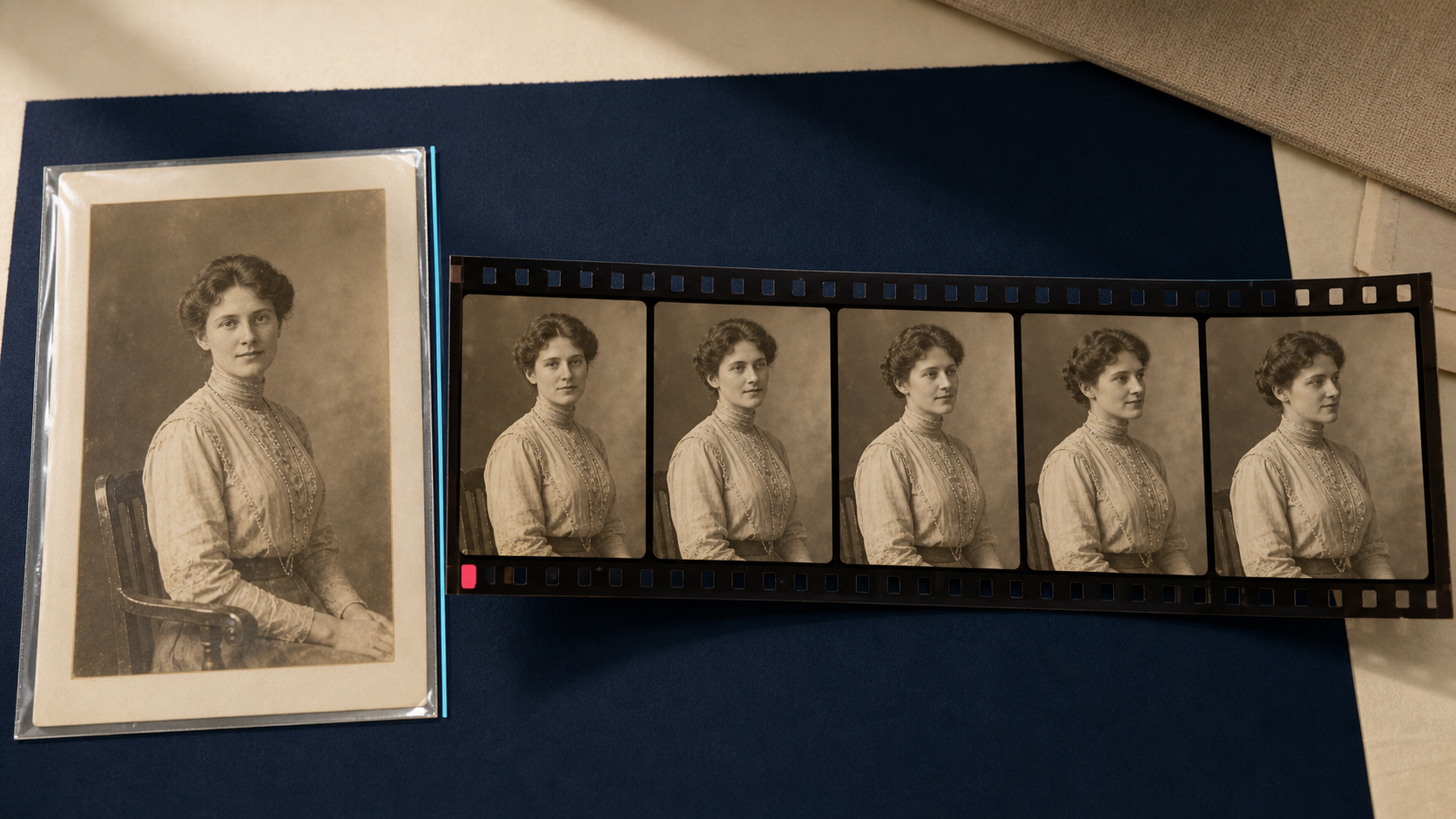
Animating a vintage photograph can turn a familiar portrait or street scene into a striking short video. It can also create movements, expressions, and details that never existed in the historical record. A careful workflow therefore begins with preservation, not animation.
The safest approach is to keep the original scan unchanged, restore a separate working copy, and treat every generated frame as an interpretation. This protects the source while giving editors, family historians, museums, and documentary teams room to experiment with motion.
Restoration and animation are different jobs
Photo restoration tries to make damage less distracting while respecting the information present in the source. Typical work includes correcting a faded tonal range, reducing scanner noise, repairing isolated scratches, and improving local contrast. Even these changes require judgment: film grain may be part of the photograph, and an apparent mark may belong to the original scene.
Animation is generative. An image-to-video model must invent intermediate frames, movement, depth, and areas that the photograph does not reveal. A blink, smile, head turn, moving vehicle, or shifting shadow is a model prediction rather than recovered evidence. The finished video should not be presented as original footage.
This distinction determines how files should be stored and described. The scan is the source record. The restored still is an edited derivative. The animation is a generated interpretation based on that derivative.
Start with a preservation-first file structure
Keep the physical photograph after digitization and avoid making restoration edits directly on the first high-quality scan. The U.S. National Archives describes preservation masters as high-quality files that typically do not undergo significant processing. Those masters can be used to create reproduction and distribution copies without repeatedly handling or rewriting the source.
A practical project can use three levels:
- Preservation master: the best available scan with its original dimensions, color information, and metadata retained.
- Restoration working copy: a duplicate used for cleanup, tonal correction, and experiments.
- Delivery derivatives: resized stills, animation inputs, video files, thumbnails, and social variants.
Use stable file names that connect every derivative to the source record. Record the scan date, owner or collection, known people and places, and each transformation applied. A generated video is much easier to interpret when its relationship to the original photograph is documented.
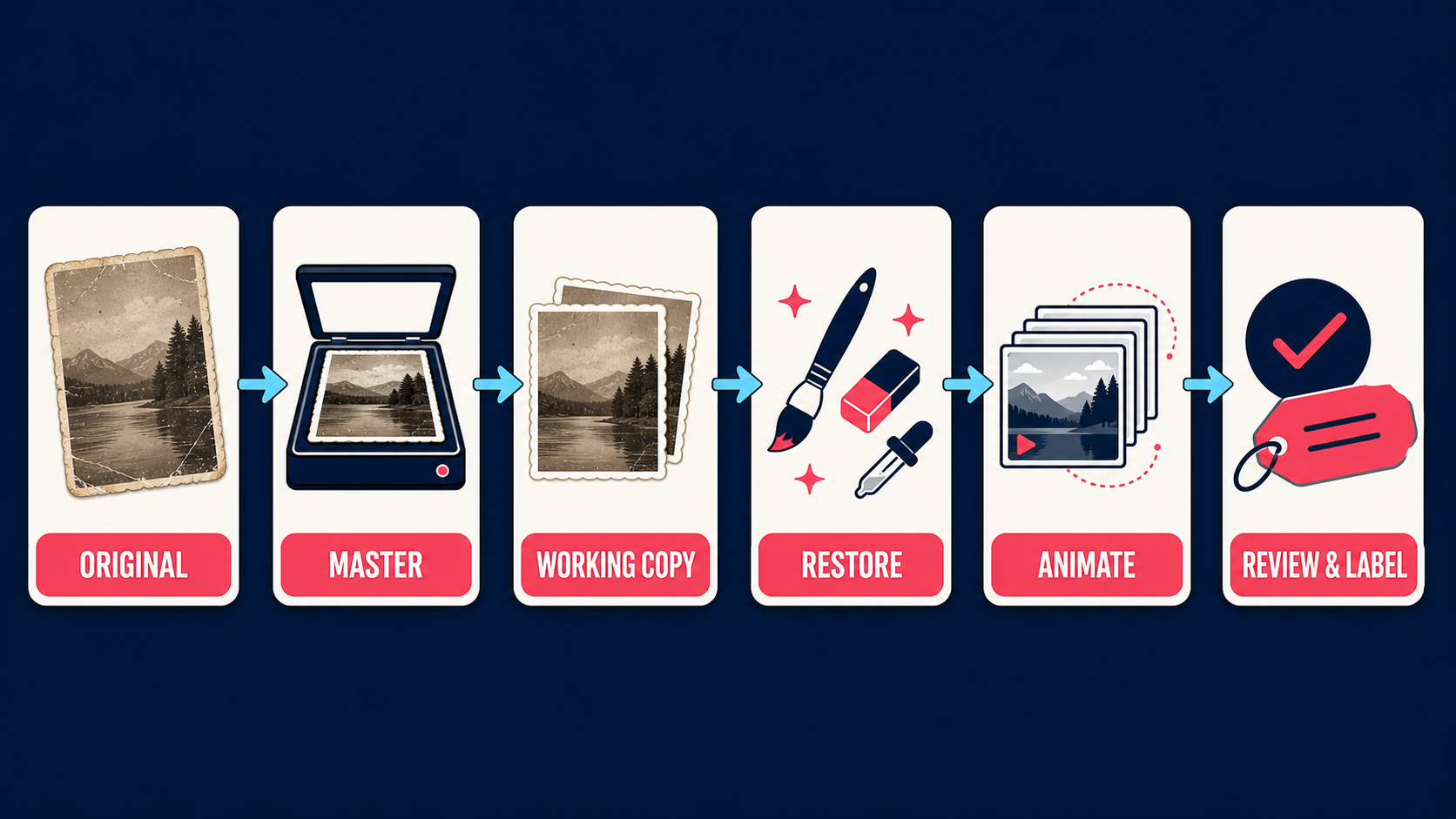
A careful workflow for restoring and animating vintage photos
- Capture the complete original. Scan or photograph the entire item, including borders, annotations, and physical damage that may carry context. Avoid automatic corrections during capture when they would alter the master.
- Create and protect the master file. Store the first high-quality capture separately. Work only on a copy and keep a backup in another location.
- Restore conservatively. Correct global exposure and color first, then address dust, scratches, noise, and blur. Inspect faces, text, clothing, and architectural detail at high magnification after every major operation.
- Prepare an animation input. Crop or resize a new derivative for the selected video tool. Upscaling may give the model a larger working image, but it does not add verified historical detail to the preservation master.
- Generate limited motion. Begin with a short clip and a restrained prompt. Small camera movement, subtle parallax, or modest facial motion is easier to review than a long sequence with several independent actions.
- Review the complete clip. Examine identity, geometry, period details, frame edges, and temporal consistency. Reject a result that changes the person or introduces misleading objects.
- Label and store the derivative. Keep the generated clip separate from the source scan and restored still. Add a visible caption or nearby description explaining that AI generated the motion.
How to prepare the restoration working copy
Begin with global corrections before local repair. Set a neutral tonal range, recover usable shadow and highlight detail, and correct a color cast only when the intended appearance is reasonably known. A monochrome photograph does not need invented color to become a useful animation source.
Remove isolated dust and scratches without flattening every texture. Heavy denoising can turn skin, fabric, and foliage into smooth shapes that move unnaturally in video. Excessive sharpening can create bright halos that flicker from frame to frame. Compare the working copy with the master frequently instead of judging the edited file in isolation.
Faces deserve special attention because small restoration errors can become large animation errors. Check the eyes, teeth, hairline, ears, glasses, and the boundary between the face and background. If one side of a face is missing or badly damaged, any reconstruction is interpretive and should be documented as such.
Context-aware AI photo restoration uses surrounding image information to guide repair. That context can help produce a coherent derivative, but it does not prove that an inferred detail matches the original scene.
Choose motion that fits the source
Not every photograph needs the same type of animation. A formal portrait may support a slow camera push, a mild change in gaze, or subtle breathing. A landscape can use layered parallax and a controlled camera move. A street scene may support motion in smoke, flags, water, or distant traffic, provided the generated action does not change the documented event.
Shorter clips are usually easier to review. Each additional second gives the model more opportunity to drift away from the source. Start with one main motion objective rather than asking for a person to turn, smile, speak, and interact with the background at the same time.
Keep the prompt descriptive but limited. Identify the intended camera behavior, subject movement, and elements that must remain unchanged. If the system supports a negative prompt or motion controls, use them to restrict identity changes, new objects, text distortion, and large facial expressions.
Quality checks before publishing an animated photo
Watch the output at normal speed, frame by frame, and as a loop. Different defects appear in each view.
- Identity drift: facial proportions, age, hairstyle, or clothing change during the clip.
- Geometry errors: fingers, glasses, buildings, vehicles, or furniture bend or merge.
- Temporal flicker: repaired scratches, edges, or textures reappear in alternating frames.
- Period errors: the model adds objects, signage, materials, or behavior inconsistent with the documented setting.
- False emotion: a generated expression implies a mood or reaction that the photograph cannot establish.
- Boundary artifacts: the frame reveals missing content around a crop or produces unstable borders during camera movement.
A technically smooth clip can still be historically misleading. Reviewers who know the collection should assess the narrative implication as well as image quality. For public exhibits, journalism, education, and documentary work, the approval record should identify who reviewed the animation and what evidence informed the decision.
Label generated motion and preserve provenance
A caption such as "AI-generated animation based on a restored photograph" gives viewers essential context. Keep the source identifier with the published asset and provide access to the unanimated still when practical. Do not describe invented movement as recovered footage.
Content Credentials can carry tamper-evident provenance information about an asset's origin and edits when the production and publishing tools support the C2PA standard. They complement visible labeling rather than replacing it. Invisible AI watermarking offers another way to connect distributed visual assets with ownership or provenance information.
File metadata may be removed by export tools or publishing platforms, so keep a separate project record as well. It should connect the preservation master, restored still, animation input, model or service used, generation date, prompts or settings, review decision, and final delivery file.
Where Deep-Image.ai fits in the workflow
Deep-Image.ai can help prepare a working derivative before it enters an image-to-video system. Its API documentation covers image enhancement and upscaling as well as sharpening, noise reduction, and automatic color operations. Apply these operations to a copy, compare the output with the preservation master, and keep the settings with the project record.
For an individual photograph, tools such as AI Enhancer Studio and AI Image Upscale can create a cleaner animation input. For a collection, use a repeatable processing profile and inspect a representative sample before running the full batch. The guides to scaling image-processing pipelines and building a real-time image optimization pipeline cover queueing, failure handling, and quality checks for larger workloads.
Animate history without rewriting it
AI animation can make an archive more approachable, but motion should never erase the boundary between evidence and interpretation. Preserve the original, restore a documented copy, generate restrained motion, review the full clip, and label the result clearly.
That workflow gives editors creative freedom while protecting the value of the historical photograph. The goal is not to make the past appear more certain than it is. It is to create a transparent derivative that invites viewers to look more closely at the source.
