Visual Drift in AI Product Photography: How to Prevent It
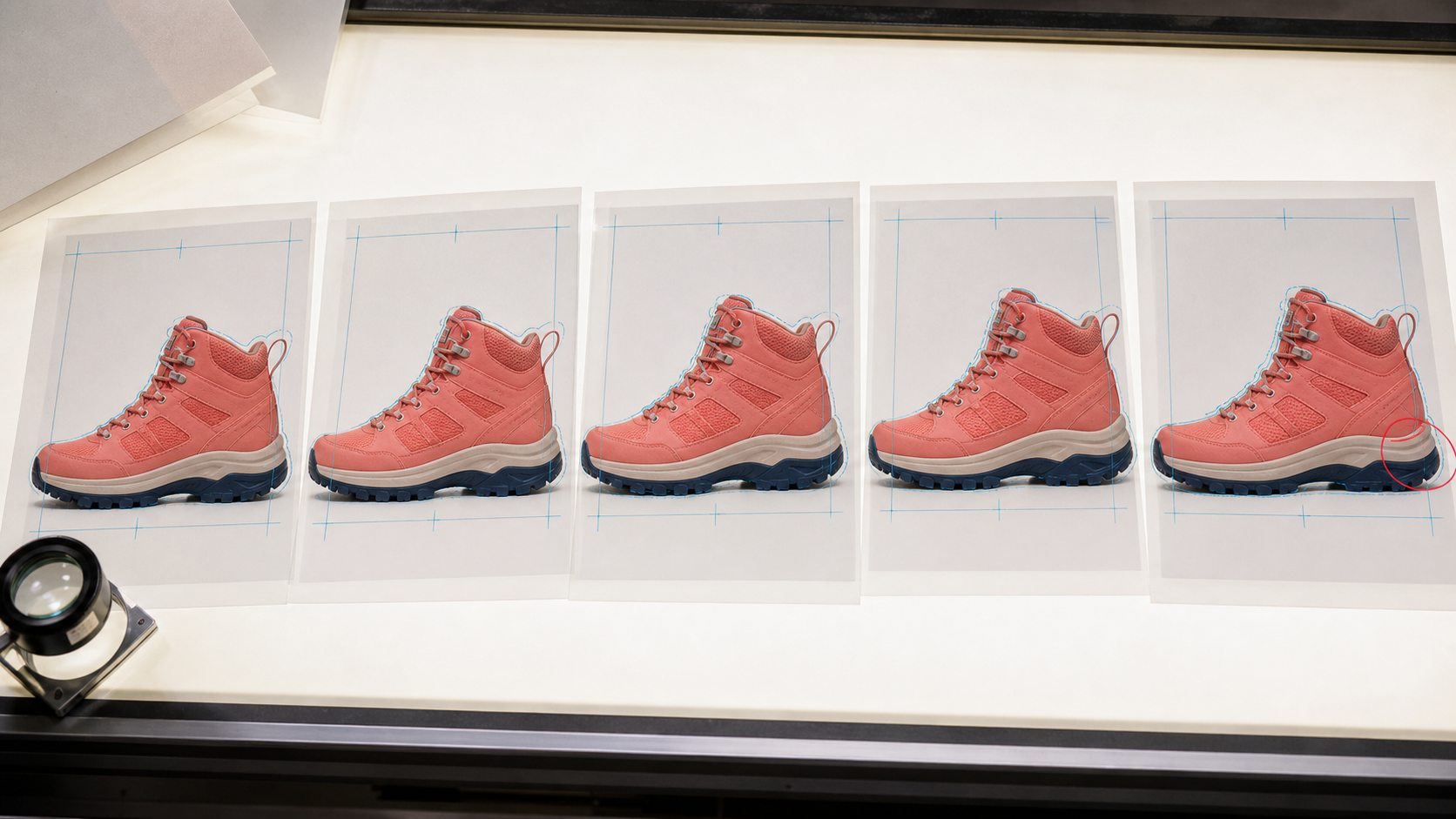
Visual drift is the gradual loss of product identity across AI-generated or AI-edited images. A shoe gains a different sole. A bottle cap changes height. A fabric pattern shifts. The result may still look convincing, but it no longer shows the item being sold.
For e-commerce teams, that is not a cosmetic defect. Product images communicate variant, color, material, included components, and condition. A visually attractive derivative that changes those facts is the wrong asset.
What visual drift looks like
Drift is often small enough to escape a quick review. Common examples include:
- a logo or label that is redrawn rather than preserved;
- laces, seams, ports, buttons, or closures that move;
- a color variant that becomes warmer or more saturated;
- a glossy material becoming matte, or fabric becoming leather;
- an accessory appearing or disappearing;
- the product becoming wider, taller, thinner, or more symmetrical.
These errors become easier to spot when several derivatives are viewed together. One image may look plausible in isolation, while the set reveals that the product changes from scene to scene.
Why generative editing can change the product
An image generator does not necessarily treat uploaded pixels as an immutable object. Depending on the tool and edit, it may reconstruct parts of the scene to satisfy the prompt. A request to place a sneaker in a new environment can therefore redraw the sneaker along with the environment.
Prompting helps define constraints, but a sentence such as “keep the product unchanged” is not a technical lock. If exact preservation matters, the workflow must reduce how much of the product the generative step is allowed to touch.
Repeated edits increase the risk. A derivative becomes the input to another transformation, then another. Each pass can introduce a small change, and later passes treat that change as part of the source. This is why the original packshot should remain the source of truth.
Define a product identity specification
Before generating derivatives, record the properties that identify the SKU:
- silhouette, proportions, and camera angle;
- variant color, material, finish, and texture;
- label copy, logo placement, and packaging structure;
- number and position of functional details;
- included parts and accessories;
- condition details that affect the offer.
Use high-resolution reference images from more than one useful angle when the object has important side or rear features. Pair those references with the correct SKU and variant data. Google Merchant Center likewise recommends that the submitted image match the correct color, pattern, and material variant in its product image specification.
The identity specification gives reviewers a concrete checklist. “Looks like the product” is subjective; “the pump has the same height, direction, and collar geometry” is testable.
Choose compositing when pixels must stay fixed
For many catalog workflows, the safest architecture is compositing:
- capture an accurate master packshot;
- isolate the product with a clean mask;
- generate or photograph the background separately;
- place the original product pixels into the scene;
- add contact shadow, reflection, and color integration without repainting the item.
This approach separates product truth from presentation. The background removal tool can produce the cutout, while an AI background generator can create context around it.
Compositing is not automatically convincing. Perspective, light direction, scale, and contact shadow still need to agree. The important difference is that the product itself remains traceable to the master rather than being regenerated for every scene.
When generative editing is appropriate
Generative editing can be useful for low-risk presentation changes, small background repairs, or images where exact product identity is not the claim. It becomes risky when the edit crosses the product boundary or reconstructs labels and functional details.
If the tool supports a mask, exclude the product from the editable region. Use a conservative prompt that lists the preservation invariants. Then compare the output with the original at the same crop and resolution.
For prompt patterns that make these constraints explicit, see our image enhancement and restoration prompt guide.
Build automated drift checks
Automated checks should catch obvious failures before a human review. A useful pipeline can test:
- whether the product bounding box and silhouette moved;
- whether key landmarks remain in the same relative positions;
- whether dominant product colors moved outside an accepted tolerance;
- whether required label or logo regions are still present;
- whether the derivative contains the correct number of components;
- whether the crop, dimensions, and alpha meet the destination rules.
Perceptual similarity alone is not enough. A model may rate two shoes as highly similar even when a buckle or sole pattern has changed. Combine global similarity with checks on business-critical regions.
Review at full resolution
Place the master and derivative side by side at 100% zoom. Compare geometry first, then color, material, labels, and small hardware. Toggle rapidly between aligned images to reveal movement around edges and landmarks.
Review the full set for the SKU, not only individual files. Visual drift often appears as inconsistency between otherwise acceptable derivatives. Reject the output if a shopper could reasonably infer a different variant, feature, or included component.
Record the reason for rejection. Repeated errors should become new checks or stricter masks, not permanent manual chores.
Version every derivative
Keep the master immutable and store each approved result as a derivative with its source ID, tool version, prompt, mask, settings, and approval status. Do not overwrite the only accurate packshot.
Stable lineage also makes rollback possible. If a background campaign is rejected or a model update introduces drift, the team can regenerate from the verified source rather than from an already modified asset.
Accuracy before volume
The solution to visual drift is not a more elaborate prompt or a promise that one model will never change a product. It is a workflow that limits the editable region, preserves an immutable source, defines product invariants, and checks every derivative against them.
Start with a small representative set of difficult SKUs. Measure which details move, strengthen the identity specification, and automate only after the outputs pass review. For a broader authenticity framework, see our guide to AI product photography and consumer trust.
